The expensive AI UGC mistake is not a bad render.
It is animating, editing, captioning, approving, and posting a bad render nobody stopped to inspect.
Most quality guides are prompt lists. Prompts matter. A checklist matters more because every model produces a distribution. One output looks frighteningly good, four look acceptable on a small preview, and one has a second thumb hiding behind the phone.
Your job is selection.
This is the checklist I would put between generation and publish.
The three gates
Do not review the whole video as one vague object.
Review it through three gates:
- Frame gate: Is the person, product, and scene worth animating?
- Motion gate: Did animation preserve what passed the frame gate?
- Creative gate: Is this a good post after the pixels are correct?
A video can pass the first two and still fail the third because the hook is weak.
That distinction saves time. "This feels off" is useless feedback. "The avatar changed identity between frame and motion" tells you where to rerun.
Frame gate: inspect before you animate
1. Identity matches the approved base
Look at face shape, eye spacing, nose, mouth, hairline, and any distinctive feature. Hair color alone is not identity.
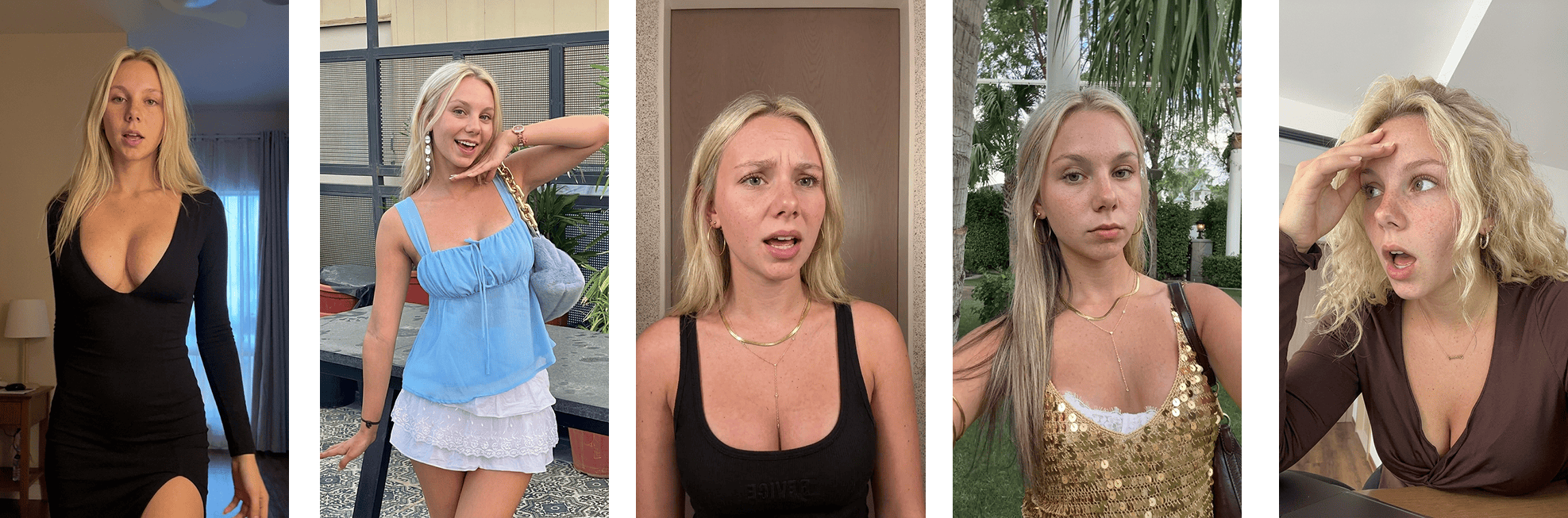 Character consistency from one locked base reference
Put the candidate beside the base image. Do not rely on memory.
Reject:
- eye color changed;
- jaw got narrower;
- freckles vanished;
- hairline moved;
- the person looks like a sibling instead of the same person.
If the account is supposed to build a recognizable persona, "close enough" compounds into a new face every week.
2. Expression earns the hook
The face and sentence need to belong to the same moment.
Hook:
I just realized I have been paying for this twice.
Correct expression: disbelief, mild annoyance, looking at the screen.
Wrong expression: cheerful beauty-shot smile.
An emotional frame is useful only when the hook gives the emotion a reason.Do not select the prettiest face. Select the performance.
3. Eyes have one target
Humans notice eye direction before they notice skin texture.
Decide where the person is looking:
- camera;
- phone;
- laptop;
- object entering frame;
- somebody off-screen.
Both eyes should agree. The head angle should support it. If the hook says the person just saw something on a laptop and they stare warmly into the camera, the scene is lying.
4. Hands survive a full-screen crop
Zoom in.
Count fingers. Follow the outline. Check the contact point between hand and object.
Common failures:
- fingertip dissolves into phone;
- palm attaches at the wrong angle;
- two fingers share one nail;
- hand passes through hair;
- mug handle has no opening;
- sleeve becomes skin.
If hands are not essential, crop them out or choose a simpler pose. A prompt cannot negotiate with geometry after the render exists.
5. Product truth is intact
Generated product shots are dangerous because they can look polished while being wrong.
Check:
- logo spelling;
- packaging color;
- cap, label, and button placement;
- interface text;
- price;
- feature shown;
- before/after claim.
For software, I prefer a real screen recording. Let the generated person introduce the proof. Let the product prove itself.
6. The scene feels inhabited
AI rooms often look like listings. Everything coordinated. Nothing used. One decorative plant assigned by committee.
Native UGC backgrounds have reasons:
- charging cable;
- water glass;
- half-open door;
- bag on a chair;
- uneven stack of books;
- ordinary light.
Do not add clutter for the sake of clutter. Add one or two details that make sense for the person and moment.
7. The image is not suspiciously perfect
Plastic skin is one failure. So is a pore pasted over a beauty render.
Look for:
- symmetrical lighting;
- over-sharpened eyelashes;
- identical skin texture everywhere;
- perfect teeth during a candid reaction;
- aggressive background blur;
- fashion-campaign composition;
- every object aligned to the frame.
UGC can be attractive. It should not look like the person had a 12-person crew before opening TikTok.
The approval checkpoint
The cheapest workflow improvement I know is showing the frame before animation.
In Ghostfeed, reactions follow that sequence on purpose:
- search owned and stock templates by their opening pose;
- search the inspiration library if the first library has no suitable frame;
- import and crop an authorized reference only when the libraries do not fit;
- render the avatar into the opening frame;
- approve or regenerate the frame;
- choose exact-motion clone or newly directed prompt animation;
- animate only after approval.
This prevents the classic failure where the team spends money making the wrong face move beautifully.
If the source is 30–120 seconds, Ghostfeed does not smuggle an arbitrary excerpt into the render. The connected agent returns the dashboard link, where I can set the crop or use Smart Crop to turn detected scene boundaries into several short templates. I review those candidates before the agent continues.
That is a useful AI reviewer because it acts through Ghostfeed MCP and still has nowhere to bypass approval.
Motion gate: inspect what changed
8. Watch the first second at half speed
The first second catches:
- jump from still to motion;
- face snapping into a new structure;
- fingers re-forming;
- background wobble;
- eyes changing target;
- camera moving before the body.
Watch once at normal speed. Then scrub frame by frame. If the glitch happens under the hook, assume people will see it.
9. Track identity through the worst angle
Front-facing frames are easy. Profiles and head turns are where identity leaks.
Pause at:
- maximum head turn;
- eyes closed;
- mouth fully open;
- hand crossing face;
- closest point to camera.
If the avatar becomes somebody else for six frames, it still became somebody else.
10. Motion has weight
Bad generated motion floats.
A hand moves without the shoulder. Hair moves while the head is still. The body stops but clothing keeps drifting. The phone rotates without the grip changing.
Ask:
- what started the movement?
- what mass follows?
- where does it stop?
- what is touching what?
You do not need to be an animator. Your nervous system already knows when gravity took the day off.
11. The background stays boring
Background motion should not compete with the subject.
Reject when:
- doorframe breathes;
- shelf changes shape;
- lamp grows;
- text appears on a wall;
- window view melts;
- a second person almost materializes.
People forgive a grainy room. They do not forgive a room developing organs.
12. Audio belongs to the face
For any speaking clip, check:
- mouth begins when audio begins;
- hard consonants match;
- lip closure happens on B, M, and P sounds;
- emotion in voice matches expression;
- breath and pause feel placed;
- sync still holds at the end.
Lip sync that starts correctly and drifts later is more common than a totally broken clip. Watch the last line.
If the format does not need speech, do not add it to show that the model can.
13. The loop or ending is intentional
Autoplay loops expose bad endings.
The person may freeze, stare, or snap back to frame one. Trim before the collapse. If the loop should repeat, match the final pose to the first. If the piece has a CTA, give the viewer enough time to read it.
Creative gate: decide whether it deserves a post
A high-end AI edit is possible. This finished Shopify creative combines the generated performance with timed captions, interface overlays, sound, and deliberate pacing:
A finished AI-assisted Shopify creative. Quality has to be judged across the performance, edit, overlays, captions, sound, and pacing—not the avatar render in isolation.Polish is not the gate by itself. The assembled video still needs a specific hook, truthful proof, readable captions, and a CTA that fits the audience.
14. The hook is specific without becoming false
Weak:
This app changed everything.
Specific:
I stopped rebuilding the same client report every Monday.
Too specific without proof:
This app saves every agency 11.4 hours a week.
Specificity means a concrete person, problem, moment, or result. It does not mean inventing a decimal.
15. The proof arrives before patience runs out
If the hook promises a feature, show the feature.
A practical sequence:
- 0-2s: person and pain;
- 2-5s: product action;
- 5-8s: result;
- final beat: CTA.
That timing is an example, not a law. The law is that viewers should not sit through ten seconds of setup for a two-second screen.
16. Captions help instead of vandalizing
Check captions on the actual phone layout.
- no text under platform controls;
- no six-line paragraph;
- no word-by-word animation that makes reading harder;
- consistent capitalization;
- correct product spelling;
- enough contrast over every frame;
- line breaks follow phrases.
Bad break:
I stopped paying
for this after I
Better:
I stopped paying for this
after I found the duplicate
Readability is a production requirement, not decoration.
17. The CTA matches the audience state
Cold audience:
save this before your next renewal
Problem-aware:
check which subscriptions renewed this month
Product-aware:
try the duplicate-charge scan
Asking a cold viewer to "buy now" after a vague reaction wastes the rest of the creative.
A scorecard your team can use
Score each item 0, 1, or 2.
- 0: fail, cannot ship;
- 1: usable but visible weakness;
- 2: clean.
| Area | Check |
|---|---|
| Identity | Face matches approved base through the whole clip |
| Performance | Expression and eye target match the hook |
| Anatomy | Hands, teeth, and object contact survive inspection |
| Product | Interface, package, logo, and claims are true |
| Scene | Background is coherent and does not morph |
| Motion | Body, clothing, hair, and camera obey the same movement |
| Audio | Voice, emotion, and lips stay synchronized |
| Hook | Concrete, legible, and supportable |
| Proof | Arrives early and demonstrates the promise |
| Assembly | Captions, crop, safe zones, ending, and CTA work |
My hard rule: any zero blocks the asset. A total score does not average away six fingers.
Rerender the smallest broken thing
Do not restart the whole pipeline because one layer failed.
- Wrong face or hand: regenerate the frame.
- Frame good, motion bad: rerun animation from the approved frame.
- Motion good, hook weak: change the copy and caption package.
- Product screen wrong: replace it with real screen capture.
- CTA weak: edit the ending.
This is why files and approvals need versioning. Keep the last clean stage.
Build preference memory
After 100 assets, your rejection history is more valuable than another generic prompt guide.
Track why a frame lost:
- too polished;
- wrong eye target;
- weak expression;
- identity drift;
- hand artifact;
- scene mismatch;
- product error.
Also track why a frame won.
The team should be able to retrieve "approved desk reactions for Nova" instead of generating from zero because nobody remembers what worked.
Ghostfeed stores avatars as image libraries and lets generated frames and videos carry preference state. The operational point is bigger than the feature: quality improves when the system remembers taste.
The part no quality checklist fixes
A technically clean video can still be boring.
Realistic skin does not create an opinion. Correct fingers do not create product-market fit. A consistent face does not create a reason to save.
Quality control earns the idea a fair hearing.
The idea still has to do the work.
For the full production system, tokenomics, persona setup, and account operation, read the No BS guide to AI UGC at scale. Use this checklist at the handoff between every stage, before another bad decision makes the asset more expensive.