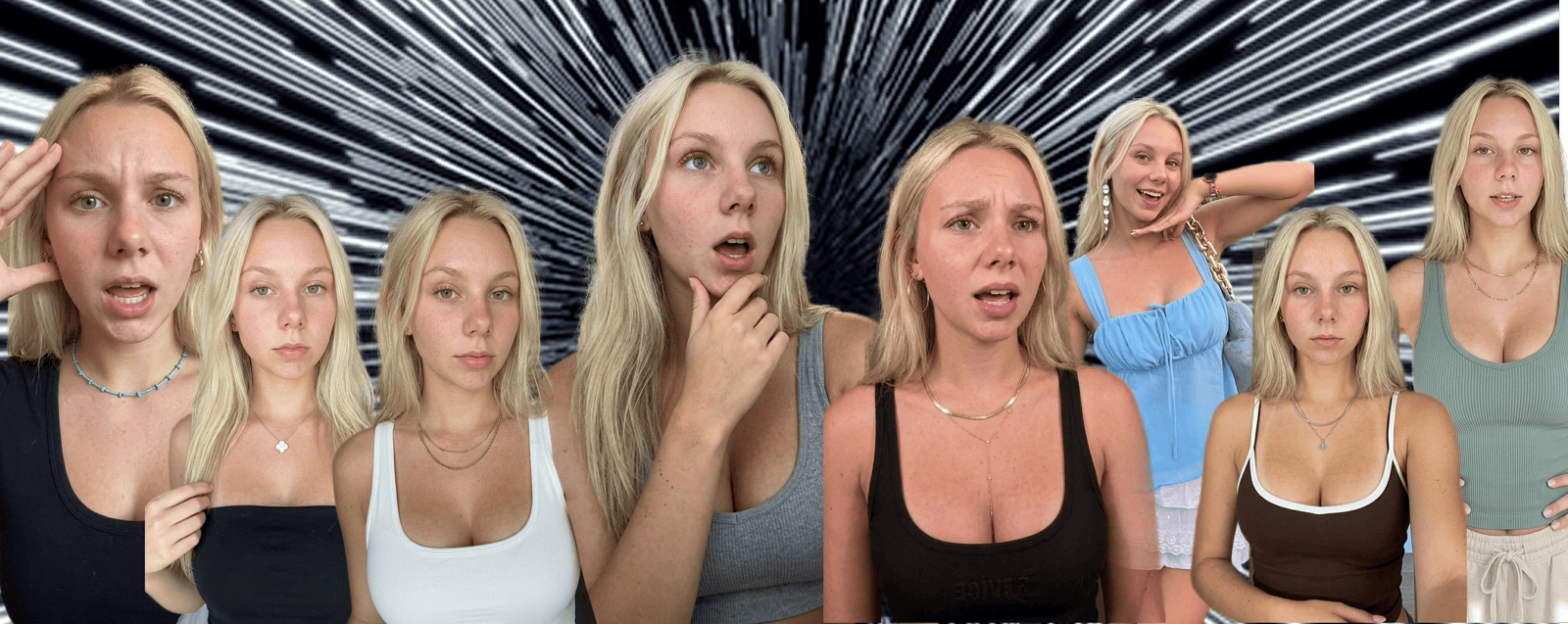
How to build a system that produces 2M views a week across 12 AI personas for my SaaS product.
I was documenting my learning to create a claude skill, hence this blog is born out of selfish desire - not altruism. You betchya its gonna be a good read.
1. Tokenomics and Formats
If you are serious about doing this at scale, let's run the math first. Its far more important to be able to do this in high volume, than to create a few good videos.
The Tokenomics needs to work, and possible formats are born out of that constraint, not the other way around (learned this the hard way).
720p is fine (UgC content is often grainy).
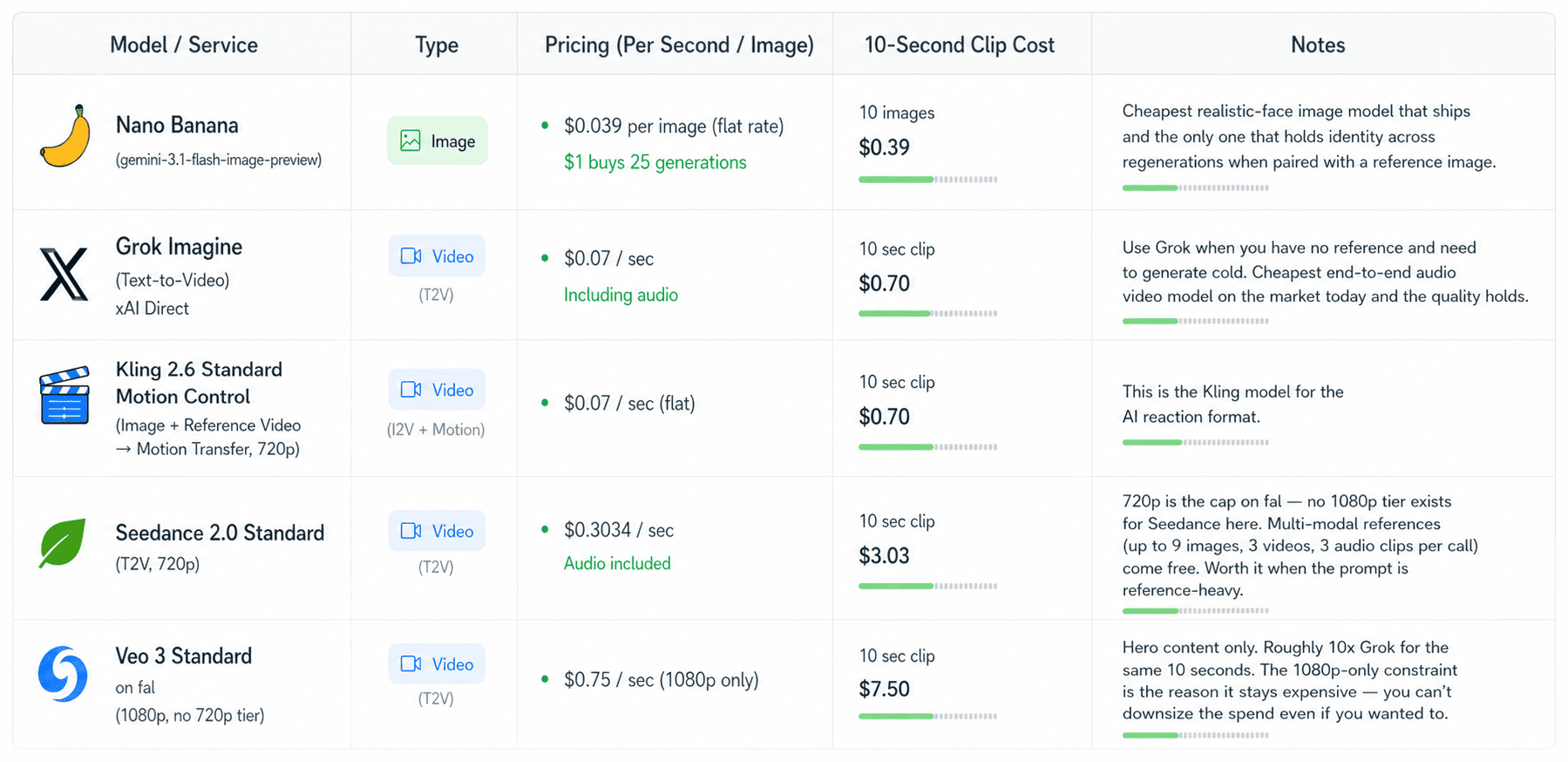
Here is a cost chart:
 Cost per second across major image and video models
- Nano Banana (gemini-3.1-flash-image-preview): $0.039 per image. Flat rate, regardless of aspect ratio. $1 buys you 25 generations.
- Grok Imagine (text-to-video from scratch, xAI direct): $0.07/sec. 10-sec clip: $0.70. Use Grok when you have no reference and need to generate cold. Cheapest and quality is top tier in my experience. Use when you don't have a reference video.
- Kling 2.6 Standard Motion Control (image + reference video → motion transfer, 720p): $0.07/sec, flat. 10-sec clip: $0.70. This is the best for workflows that start from a reference video.
- Seedance 2.0 Standard (T2V, 720p): $0.3034/sec. 10-sec clip: $3.03. 720p is the cap on fal. Godly level of realism, worth it for ads not for UgC reaction.
- Veo 3 Standard on fal (1080p, no 720p tier): $0.75/sec. 10-sec clip: $7.50. Hero content only.
Grok and Kling Motion Control are the two we need to work with for the tokenomics to were (and to be honest they mog other models anyway): Grok generates from cold text, Kling transfers motion from a reference video onto your locked persona image. Seedance wins when you need to feed it 5+ reference assets in a single call. Veo - pick it only when the shot would otherwise be impossible (at that price point you might as well start paying a real creator).
Now given the tokenomics constraints, two main formats emerge:
-
Photo Mode slideshows (5 to 10 images, hook overlay, save-this CTA)
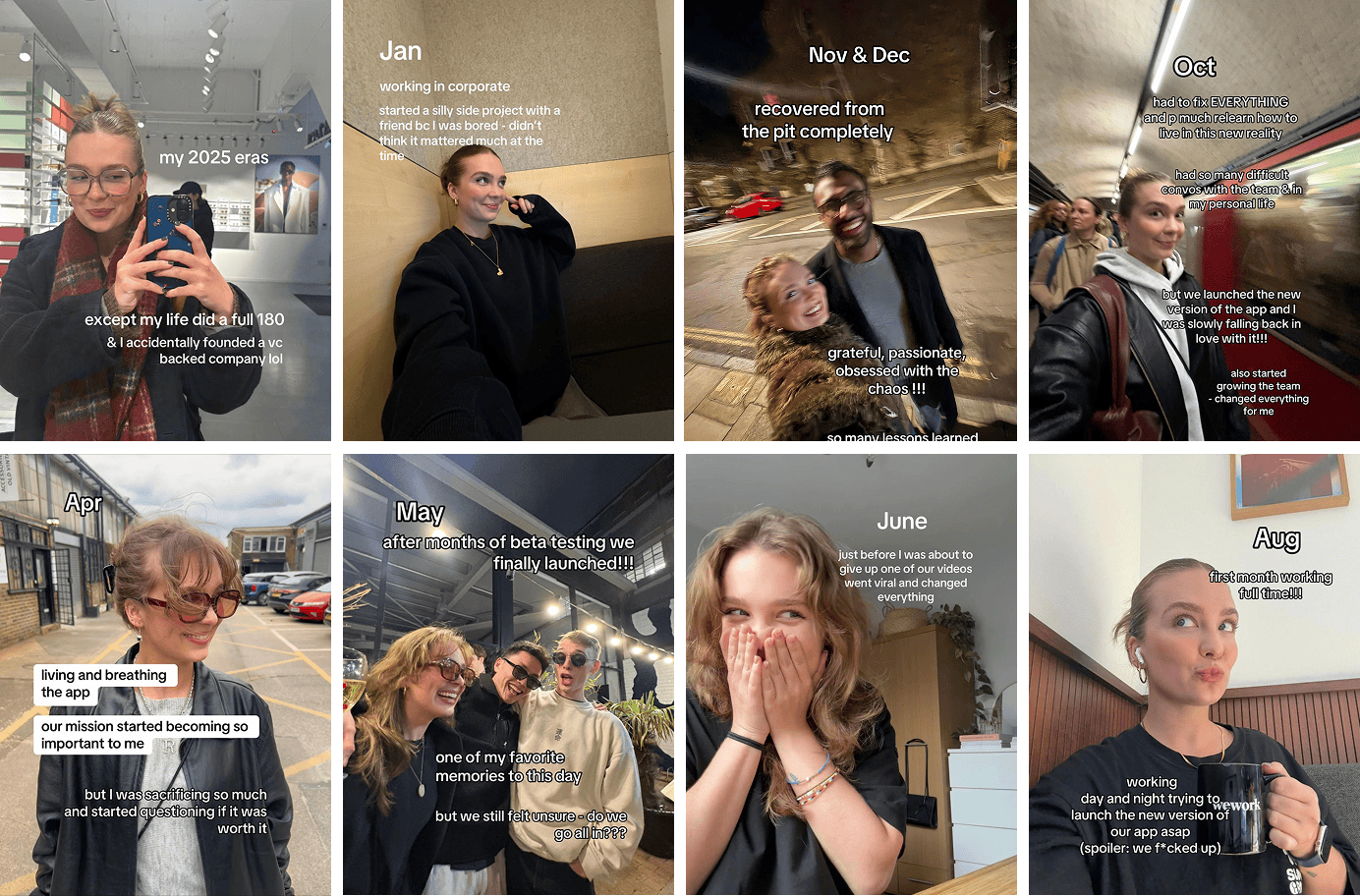 Photo mode slideshow example
 -
AI reaction videos (static face, micro-motion, on-screen text doing the narrative work)
Lets start with
1 - AI Persona driven slideshows tokenomics (1-2 AI persona images + 4-5 Pinterest):
- 1-2 Nano Banana persona images: $0.039 to $0.078
- 4-5 Pinterest images via Apify scraper (~$0.25 per 1,000 pins): ~$0.001
- Local text compositor (sharp + canvas): $0
Total per slideshow: $0.04 to $0.08, call it $0.06 average.
1 account, 1 slideshow per day: 30 slideshows × $0.06 = ~$1.80/month. Genuinely scalable.
12 accounts, 1 slideshow per day each: 360 slideshows × $0.06 = ~$22/month all-in. For a 12-persona operation pushing 360 posts a month.
I recommend using apify scraper for Pinterest images cause using claude code you can automate the fetching out photos from specific keywords (such as studytok, ivyleague in my case) and automate the entire pipeline. Additionally with tiktok content posting SDK this can function entirely on autopilot.
If you do go down that rabbit hole, I recommend using fal.ai or replicate for model APIs since they offer higher concurrency.
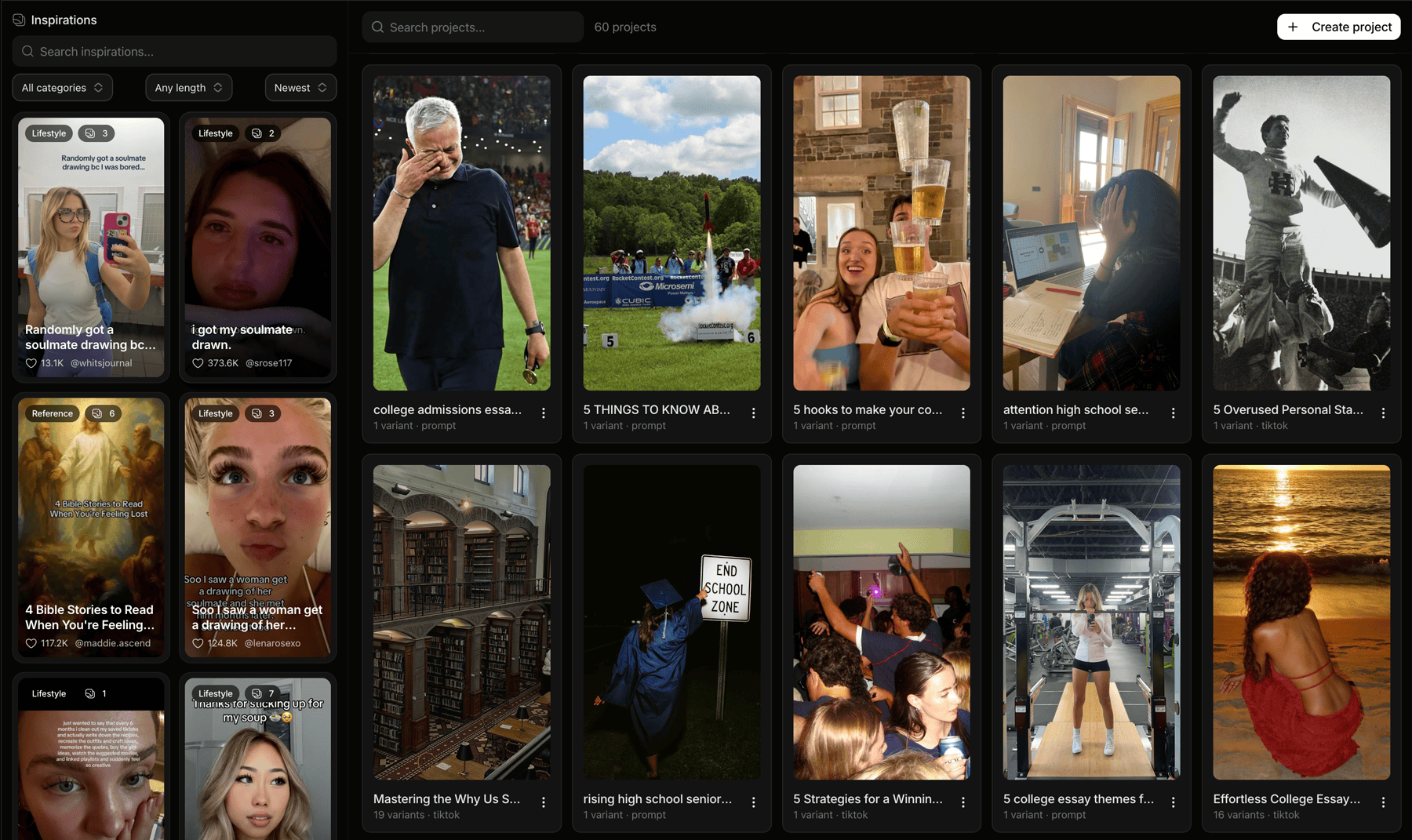
If you want to skip the work of coding this up, then head to Ghostfeed and create slideshows and set an automated posting schedule for the month. Free to try, I did not intend this to be plug, its just the best thing out there (an alternate is reelfarm).
 Ghostfeed — slideshows + automated posting schedule
PS: Pinterest-only images in slideshow arbitrage is saturated. In my experience, Pure scraped slideshows dressed up with text overlays don't perform well.
I recommend having the first 1-2 slides as your AI persona. Same locked face from your Nano Banana spec, photographed in a real-feeling moment - at her desk, in her car, on a walk.
The slideshow should feel like it's coming from a life in day of the AI persona. Not generic advice.
PS:
Apfiy offers $500 in credit for creating your own custom scrapers, so ask claude code to quickly create 2 custom scraper for tiktok and pinterest, this way all your scarping cost are 0 forever.
2 - AI reaction video tokenomics (10-second clip):
- 1 Nano Banana first-frame: $0.039. The first frame is always Nano Banana. Both video models drift the face when you let them generate the still. Pin the identity in Nano Banana, then animate.
- 1 Kling 2.6 Standard Motion Control pass (10s, 720p): $0.70
- 1 reference video (scraped off TikTok or reused from your library): $0
- TikTok trending audio overlay: $0
Total per reaction: ~$0.74.
1 account, 1 reaction per day: 30 reactions × $0.74 = ~$22/month. Same order of magnitude as the slideshow flow.
12 accounts, 1 reaction per day each: 360 reactions × $0.74 = ~$266/month all-in. 12 personas each shipping a fresh AI reaction every single day.
PS: In my experience paid customer conversions didn't just come from high view count videos, there needs to be a funnel. Either ask people to bookmark content, message in comment section, head them to DMs, or share with friends.
Example: This video of one of my AI persona did 12K views with 202 bookmarks - the bookmarks drove more signups than the 50K view video due to the right funnel.
PS: I also recommend mentioning competitor products in your videos, the videos should feel like coming from a regular person using these tools and sharing their learning and not a advert. Its more relatable.
Same format remade in minutes via Ghostfeed2. Character Consistency
Character consistency is of prime importance. Remember - we are trying to create a Persona - not just dumping AI video.
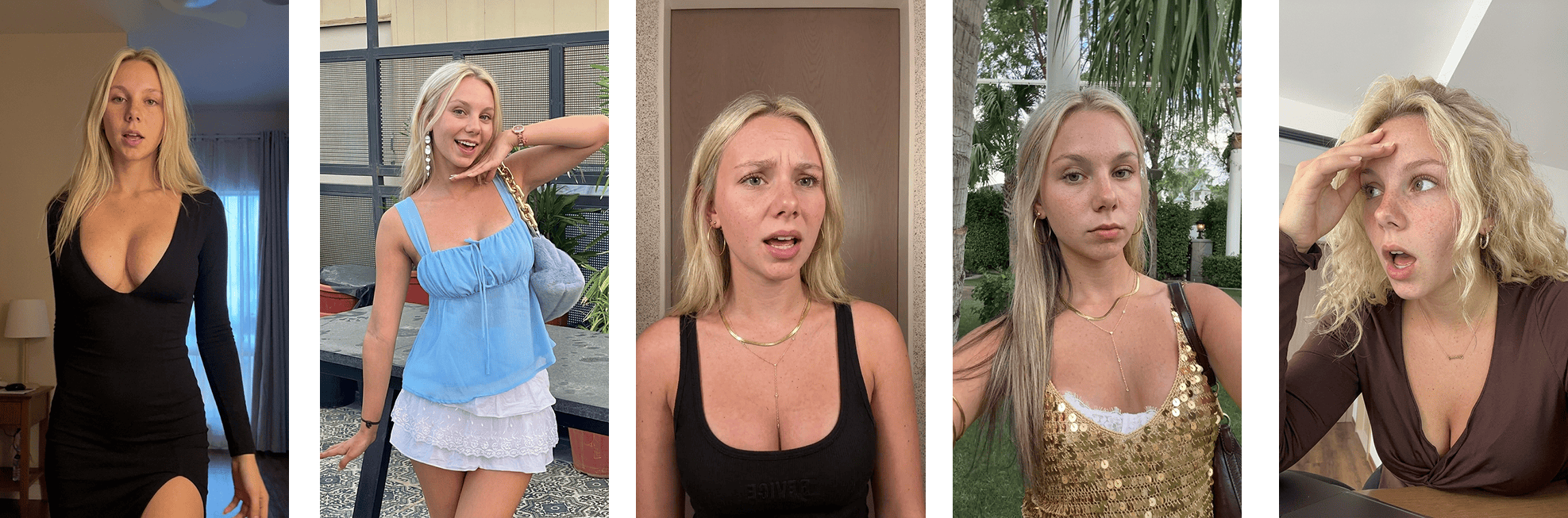 Character consistency: same Nano Banana base across multiple shots
The first image is of supremely important, all future images will stem from it.
Start by creating a very detailed prompt. Detailing is very important. Think through their hair color, heritage, chest/breast size, hair length etc. Make sure its s
Here is the actual prompt used in Ghostfeed production:
Once you have the base avatar image from Nano Banana (NEVER CHANGE IT).
Before making any new video always use the SAME base image as reference to generate the first frame with Nano Banana of video being cloned. Then send first frame + reference video to video model for final generation.
Reference video → Nano Banana first frame → final motion-controlled output3. Know your customer
There is no alternate to knowing you customer, if you don't then no matter how good your video quality is, its not going to hook the customer. Hooks are vital.
There is shortcuts here, you have to spend time brain rotting and doom scrolling on Tiktok to get to know what your customer is watching so you can then create relatable content (this will take some testing, no two ways about it).
PS: I recommend taking your best performing hooks and then create claude code skill out of it.
Example: my customer was a high schooler who used specific lingo like "senioritis", "ngl", "cooked" etc. Talked about grades, study methods, AP Exams, promp night, college tuition etc. So I made the following hooks.
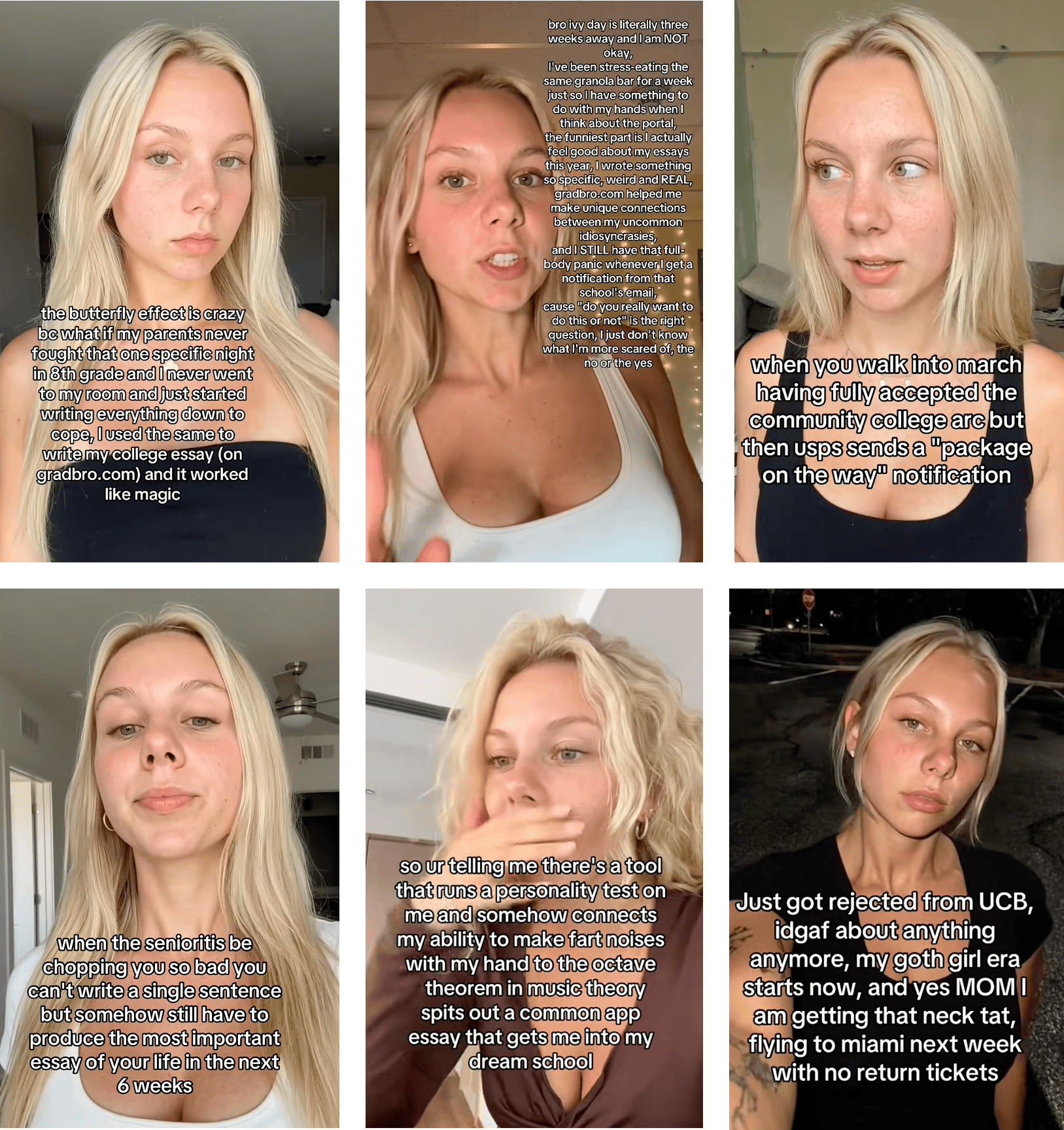 TikTok hooks I extracted into a Claude skill
When i gave these to claude code and asked it to "extract the meta-pattern: opening words, sentence rhythm, emotional triggers, where the curiosity gap sits, what's promised vs delivered", this was the resulting skill:
Not gonna lie (pun intended), it works pretty well.
PS: If you hooks being generated are AI Slop, then experiement with certain rules from the humanizer skill.
The one I use: blader/humanizer is based on Wikipedia's "Signs of AI writing" guide. Strips em-dashes, rule-of-three constructions, vague attributions, AI vocabulary words ("crucial," "leverage," "delve," "navigate"), negative parallelisms ("it's not X, it's Y"), inflated symbolism, every promotional phrase a chatbot reaches for by default.
Drop it as a Claude skill once:
Now you have to realize that the real power is in the ability to create 100s of such AI Personas and constantly iterate on the hooks.
Marketing collage — multiple personas, multiple angles4. The phone farm setup
Why phones at all, when posting via the TikTok Content Posting API works fine?
Because TikTok reads device-level signals (cached GPS, Apple ID metadata, App Store region, IP origin).
You need to be careful during setup since, it needs to be the same fingerprint and one country signal - mismatch gets you flagged and shadow banned.
A single phone can support upto 3 unique AI persona accounts in my experience. Beyond that it gets flagged. So might end up need multiple phones when you scale. I am yet to experiment with cloud phones.
My target customer were USA high-schoolers so this guide will take USA as the country of interest, process remains the same.
Step 1: Factory reset the iPhone
Settings → General → Transfer or Reset iPhone → Erase All Content and Settings. Enter the Apple ID password to disable Find My iPhone. 5–15 minutes, and the phone reboots to the "Hello" screen like new.
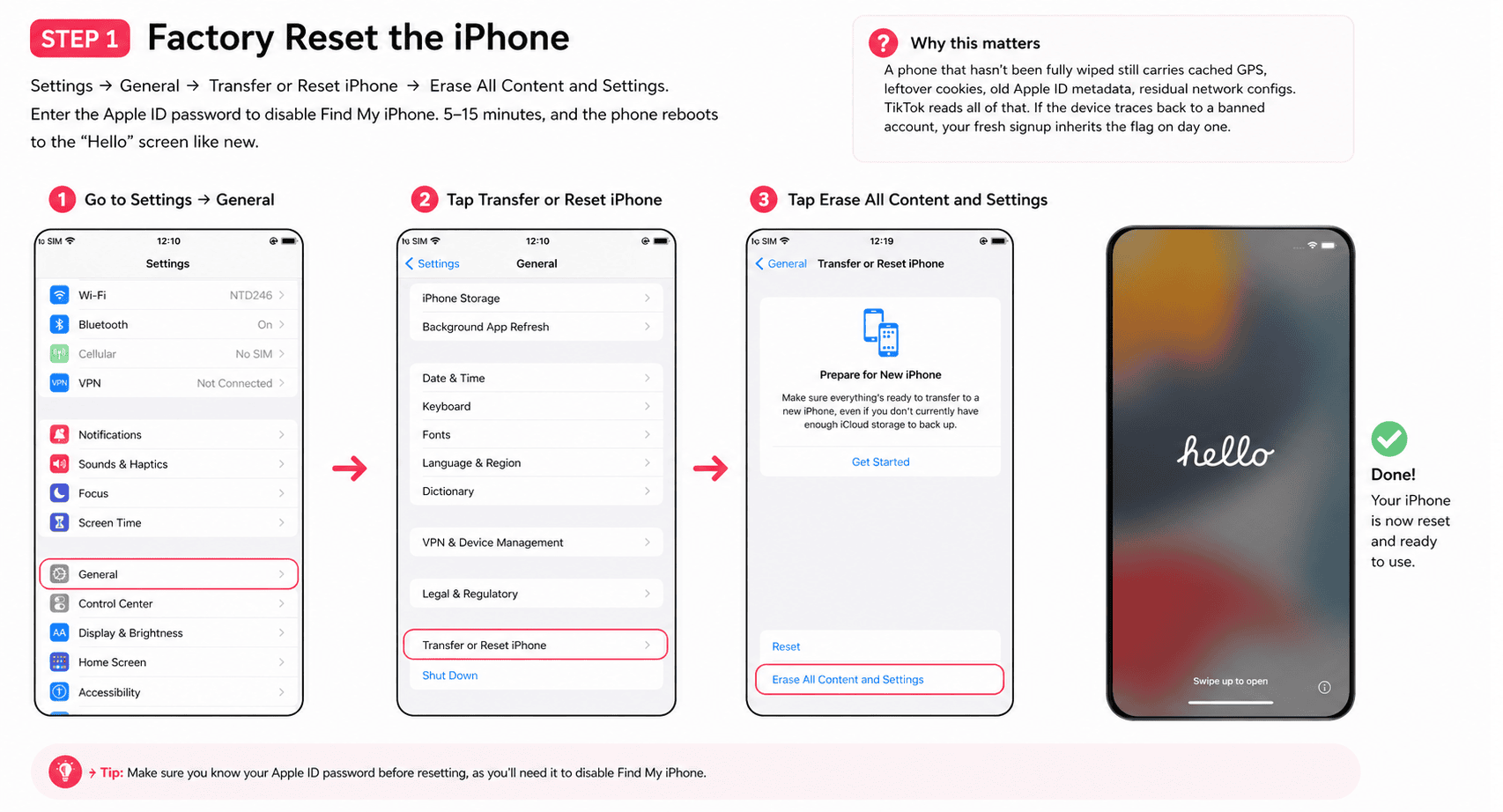 Factory reset → "Hello" screen
A phone that hasn't been fully wiped still carries cached GPS, leftover cookies, old Apple ID metadata, residual network configs. TikTok reads all of that. If the device traces back to a banned account, your fresh signup inherits the flag on day one.
Step 2: Set language and region
On the "Hello" screen, pick the language and country/region of your target market. English / United States for the US. Português (Brasil) / Brazil for Brazil. Etc.
This sets the App Store you connect to, the default keyboard, date format, currency, timezone, autocorrect — all part of the device fingerprint. Mismatch any of these against your VPN or SIM later and you're flagged.
If you're running multiple phones for the same country, keep these identical across all of them.
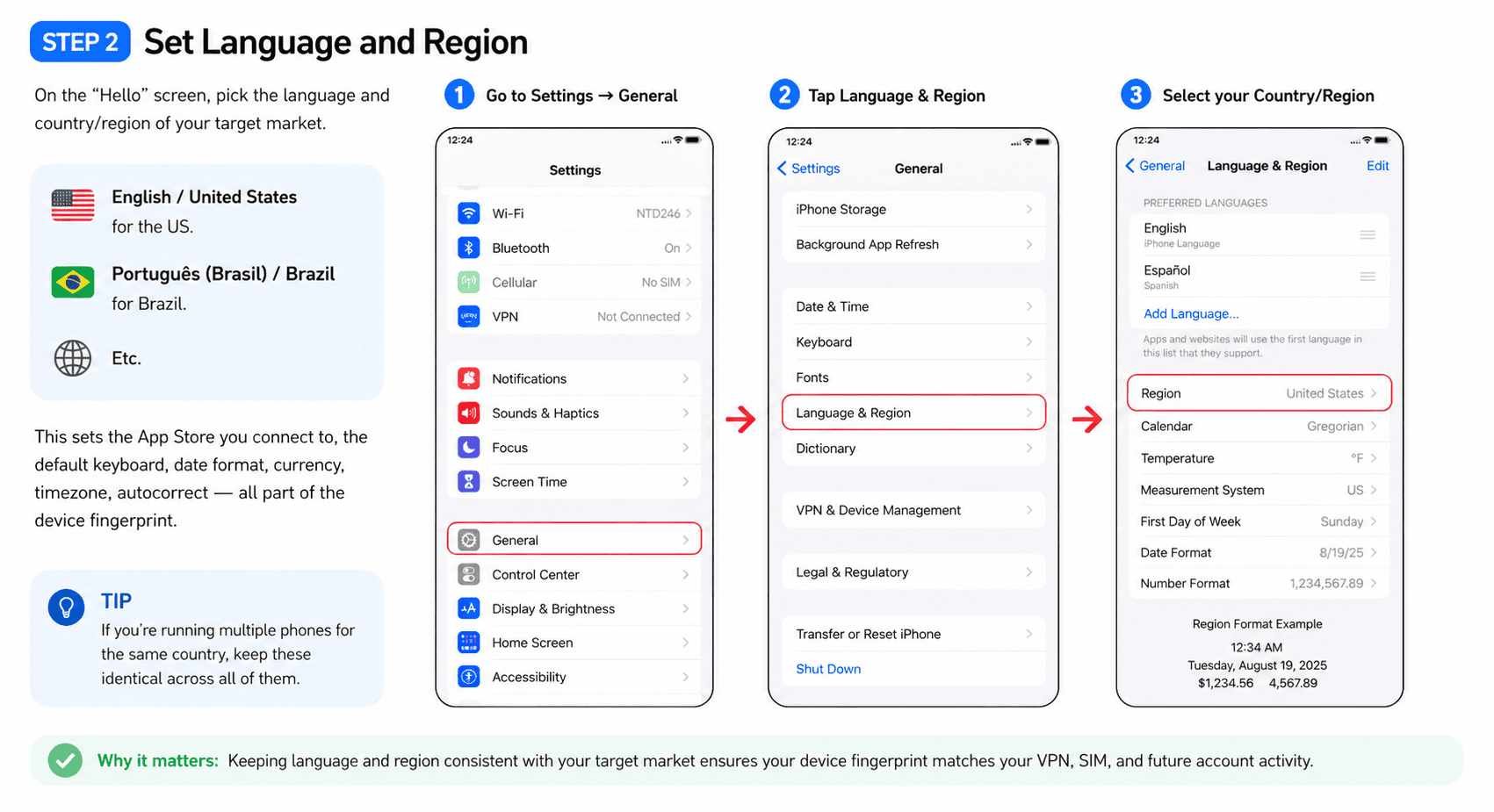 Language and region selection on iPhone setup
Step 3: Fresh Gmail, then fresh Apple ID
One Apple ID per phone. Never reuse.
- Safari → mail.google.com → create a brand new Gmail. Use Gmail specifically. Outlook, Yahoo, ProtonMail get TikTok accounts flagged at much higher rates.
- Don't pattern-match to your real email (no
[email protected]if your main is[email protected]). - Settings → Sign in to your iPhone → "Don't have an Apple ID or forgot it?" → Create Apple ID using the new Gmail. Set name, DOB, country to match Step 2.
- Verify via the code Apple sends to the new Gmail.
Old Apple IDs carry history - past devices, purchases, location data, linked phone numbers. Signing in with one undoes the clean slate from the factory reset.
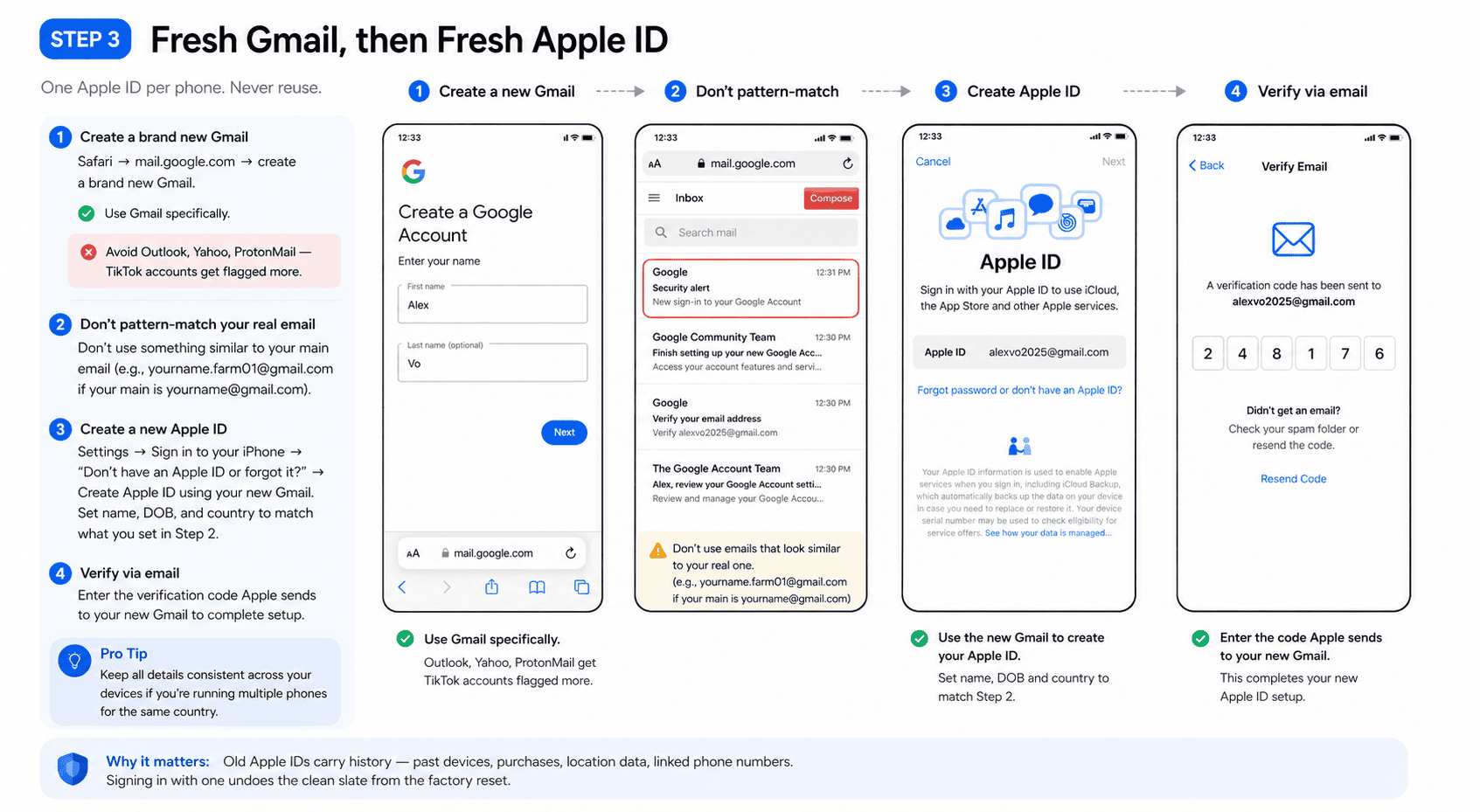 Fresh Apple ID creation
Step 4: Set App Store region to target country
Even though you already picked region in Step 2, the App Store region is a separate Apple ID setting.
- Settings → [Your Name] → Media & Purchases → View Account → Country/Region → Change Country or Region.
- Pick target country.
- Apple asks for billing address + phone in that country.
Ask ChatGPT to generate a realistic US address with matching zip/city/state — Apple validates consistency. Same for the phone: valid format, correct area code. Apple doesn't actually call to verify. Set payment to None if available.
This determines which build of TikTok you download. Different markets get different content moderation, different feature rollouts. App Store says India but everything else says US? Flag.
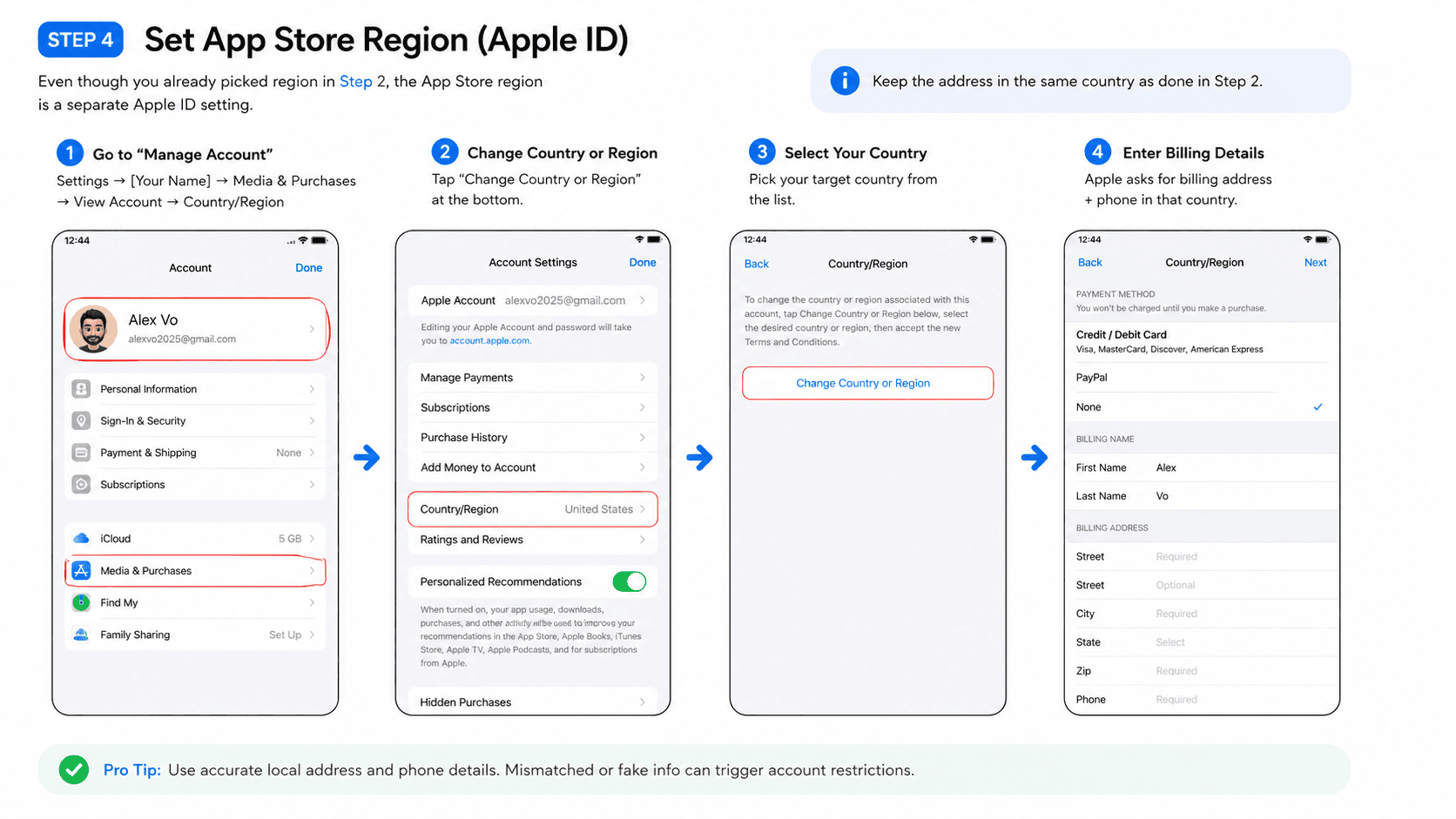 App Store region — change country or region
Step 5: VPN / proxy
This is the foundation. Every other signal — language, region, App Store, SIM — only works if the IP backs it up.
I won't name a specific provider, the market shifts every few months and what's clean today is blacklisted tomorrow. The principles are non-negotiable:
- Paid only. Free VPNs share IP pools with thousands of automation users. Those IPs get blacklisted fast.
- Dedicated / static IP. Single most important factor. On a shared IP, one bad actor on the same address gets the entire IP blacklisted and every account on it including yours gets shadowbanned.
- Skip cheap providers. Low cost = recycled, overcrowded IP pools = exactly what you're trying to avoid.
Failure modes, in order of severity:
- Shadowban — videos silently capped at near-zero views. No notification. Most common.
- Account ban — outright removal.
- Device ID ban — TikTok flags the phone itself. New VPN, new account, even another factory reset won't save it. Rare, but real, and the phone becomes useless for TikTok forever.
For starters, a residential dedicated / ISP proxy is fine. Once you're past 3 active personas, switch to 4G mobile proxies — SIM-based, rotates IP per network refresh, looks closest to a real human moving around with their phone. One proxy per device, never shared.
Providers worth looking at (verify on r/proxies and r/AffiliateMarket within the last 30 days before committing, pools rotate fast):
- Residential / ISP (one-phone setup): Rayobyte ISP (~$5/IP/mo, transparent pricing, where most people start), IPRoyal Royal Residential (cheaper, popular in social-farming circles), NetNut (cleanest pool, pricier, sourced direct from ISPs not P2P). Bright Data / Oxylabs are enterprise-tier — overkill until 10+ devices.
- 4G mobile (scaling past 3 personas): TheSocialProxy (~$90/mo per port, built specifically for social farming), AirProxy (US 4G, well-regarded for IG/TikTok), IPRoyal mobile (same dashboard if you're already on their residential).
- Avoid: anything labeled "rotating residential" with shared pools (fine for scraping, lethal for TikTok accounts), Smartproxy/Decodo residential (pool too contaminated for TikTok now), any provider whose checkout doesn't let you pick a single dedicated city/state IP.
Practical path: Rayobyte ISP on your first phone, prove the persona grows, jump to TheSocialProxy 4G when scaling to 5+ devices. The ISP → 4G jump is what unlocks running multiple phones without cross-contamination.
Step 6: Create TikTok accounts (and warm them up)
- Open TikTok (downloaded from the regionalized App Store in Step 4).
- Sign up with the fresh Gmail from Step 3. Age 18+. Pick a username.
- Additional accounts → fresh Gmail each time. Never reuse one Gmail across multiple TikTok accounts.
Cap: 2–3 TikTok accounts per device. Past that, TikTok reads the device as spam and flags everything on it at once. Start with 1. Confirm it grows. Add the second only once the first is proven healthy. Third only after that.
Warm-up matters more than people think. Account signs up and immediately posts? Bot. The algorithm watches new accounts closely.
- Day 1: don't post. Scroll the FYP 15–30 min. Watch videos fully, no skipping. Like a few. Follow 3–5 accounts in your niche.
- Day 2: keep scrolling. Leave a couple of natural comments. Not "nice." Not emojis. Real-sounding.
- Day 3+: first post. Keep mixing browsing between posts forever. An account that only posts and never watches is a flagged bot inside two weeks.
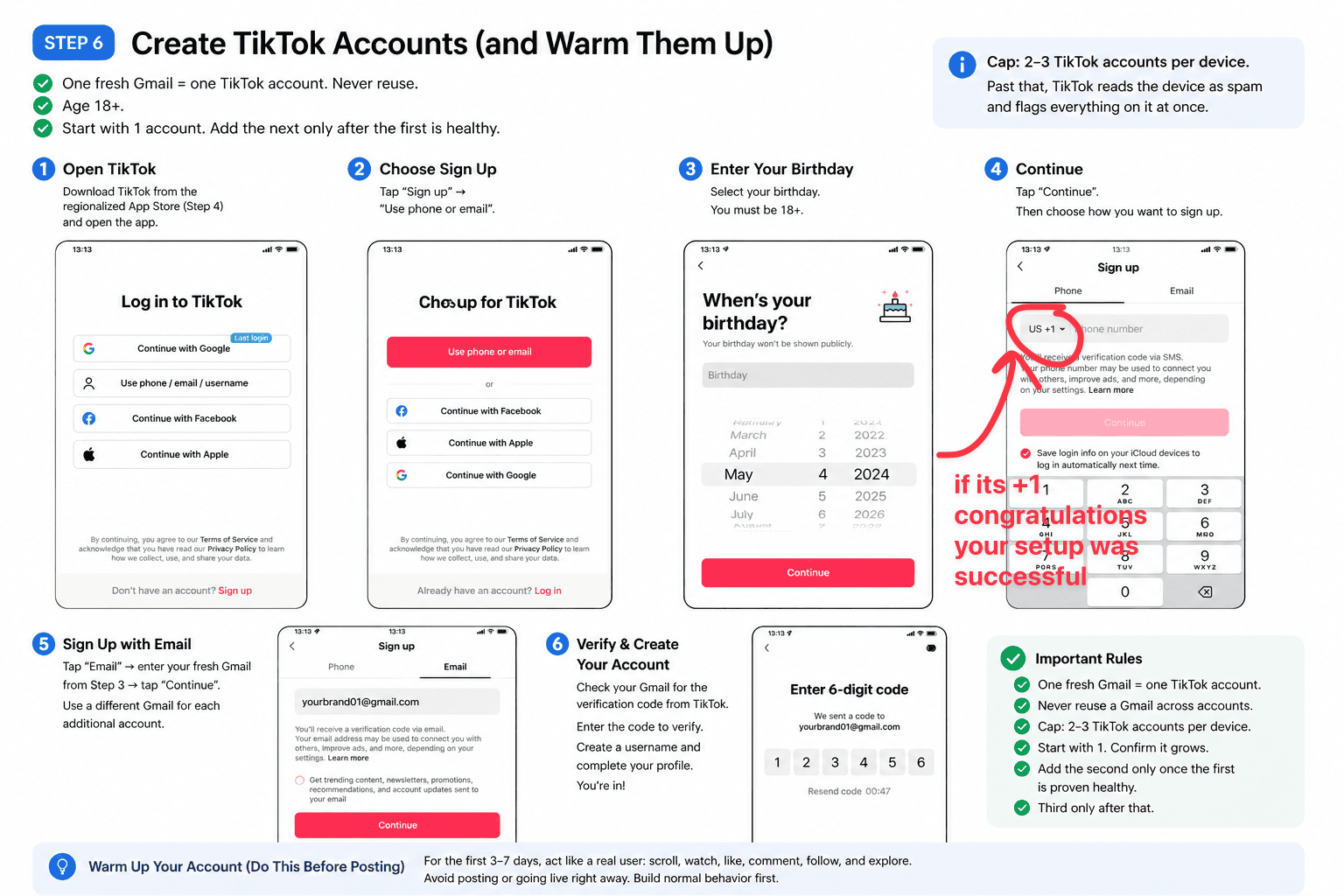 TikTok account warm-up sequence
Final discipline rules
These break accounts faster than dirty IPs do.
- VPN on first, then open TikTok. Close TikTok first, then disconnect VPN. Every session, every device, no exceptions. One leak (your real IP showing up for 30 seconds) and TikTok logs the location jump as a flag.
- Don't rapid-fire actions. 50 likes in 2 minutes, 30 follows in a row, the same comment on multiple posts — all bot signatures.
- Don't repost identical media across accounts. Same script through different personas is fine. Same MP4 uploaded twice is not.
- Don't be greedy with hashtags - don't step 10 of them in a single post - decide on a 4-5 max and post on them consistently.
5. Schedule and scale posting
Once you have your physical devices setup the remaining bottleneck will be porting content from higgsfield to your physical device every time you want to post something.
You have a few options on how to actually implement this:
Self-host route: Postiz. Open source. Multi-tenant. Official TikTok Content Posting API integration (the unofficial routes get you banned). Sub-$20/month on Railway or Coolify. Approval for the TikTok Content Posting API takes 1 to 3 weeks, so apply early. Postiz handles the API correctly, which is the hard part.
Skip-the-DIY route: Ghostfeed scheduling. Connect TikTok accounts via OAuth, drag-and-drop calendar, auto token refresh, retry with exponential backoff, error classification per TikTok API code.
This way you can schedule your post months in advance.
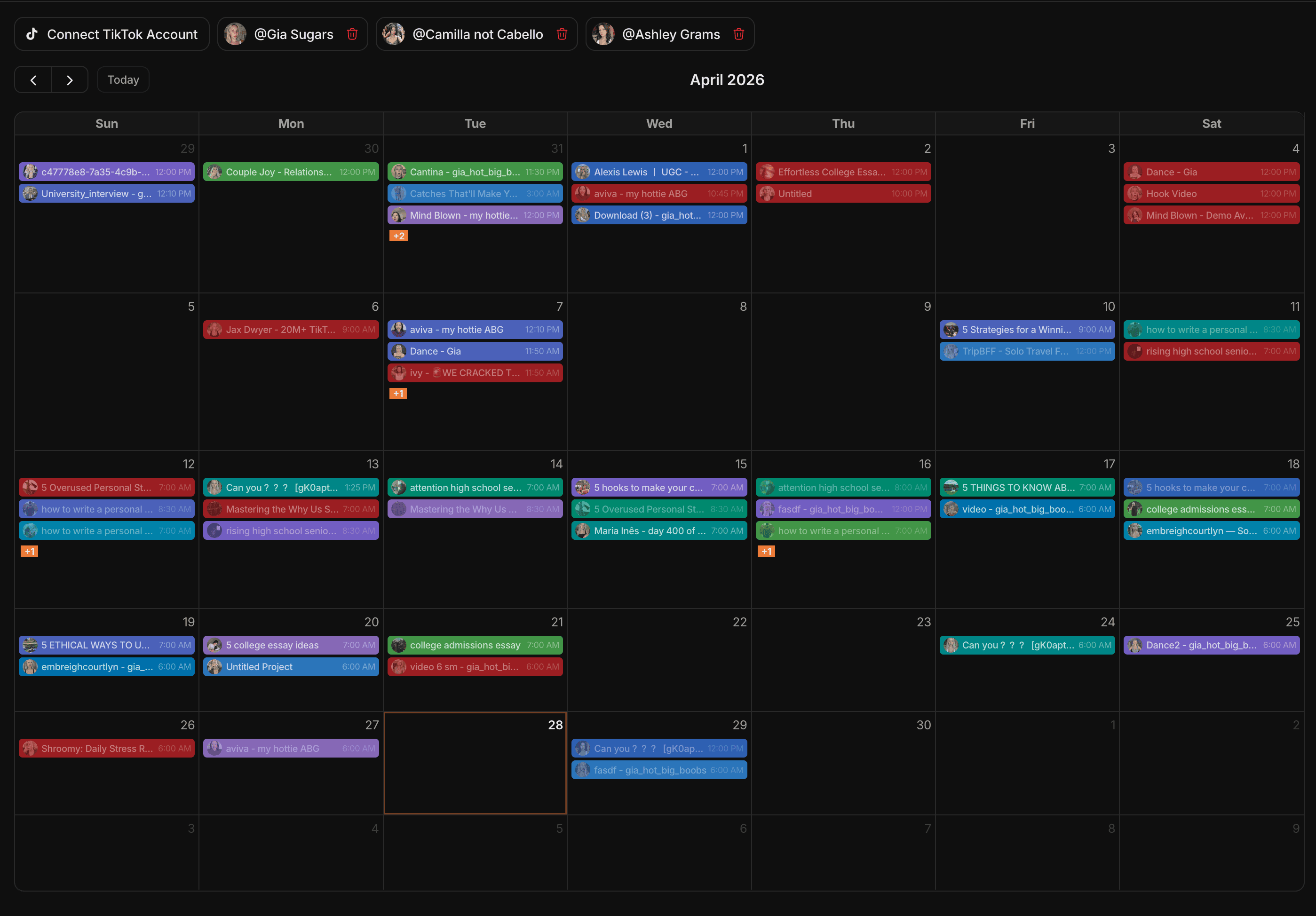 Ghostfeed scheduling calendar
Other providers include PostBridge and Zernio
Whichever way you end up going, always remember to send your content as draft mode to the physical device and then ALWAYS POST (click the final post button) through the physical device (until you reach a 1000 followers - for the first few videos, edit the video in the tiktok mobile app editor, give the algorithm human signals, as you build reputation with the algorithm).
That's it, this is everything I'm running on right now. If you ship a persona using this guide, I'd love to see it.
Good luck out there.