Make videos, slideshows & ads
in Claude with  Ghostfeed
- 1
Click Add Ghostfeed to Claude
Claude opens with Ghostfeed already filled in. Nothing to paste.
- 2
Click Add, then Connect
Prefer to do it yourself? In Connectors, add a custom connector with this link:
- 3
Sign in with Google
Pick your workspaces and you are done.
Make videos, slideshows & ads
in ChatGPT with Ghostfeed
- 1
Open Plugins in ChatGPT
In ChatGPT, open Settings → Plugins, then Add → Add MCP server.
- 2
Paste the link
Name it ghostfeed, choose Streamable HTTP and paste:
- 3
Save and sign in
Save it. The first time a Ghostfeed tool runs, sign in with Google.
Make videos, slideshows & ads
in Claude Code & Codex with Ghostfeed
- 1
Add the server
Run the command for your tool, shown on the right.
- 2
Sign in
Claude Code: run
/mcp, pick ghostfeed, choose Authenticate. Codex: runcodex mcp login ghostfeed. - 3
Pick your workspaces
Sign in with Google, choose the workspaces it can reach, and you are done.
# Claude Code$ claude mcp add --transport http ghostfeed https://api.ghostfeed.ai/api/v2/mcp# then type /mcp → ghostfeed → Authenticate# Codex$ codex mcp add ghostfeed --url https://api.ghostfeed.ai/api/v2/mcp$ codex mcp login ghostfeed
Make videos, slideshows & ads
in Cursor with Ghostfeed
- 1
Open mcp.json
Use
~/.cursor/mcp.jsonfor every project, or.cursor/mcp.jsonfor one. - 2
Add Ghostfeed
Paste the lines on the right and save.
- 3
Sign in
The first time a Ghostfeed tool runs, sign in with Google.
{
  "mcpServers": {
    "ghostfeed": {
      "url": "https://api.ghostfeed.ai/api/v2/mcp"
    }
  }
}
Make videos, slideshows & ads
in any AI app with Ghostfeed
- 1
Add a remote MCP server
In your app, add an MCP server that uses Streamable HTTP.
- 2
Paste the link
Name it ghostfeed and paste:
- 3
Sign in
Sign in with Google when it asks. Steps for more apps are in the docs.
What Ghostfeed MCP is
Ghostfeed MCP is a remote MCP server that lets an AI assistant make short-form marketing content for you: video ads, UGC videos, AI avatars, TikTok slideshows, Instagram carousels, images, songs and voiceovers. You connect Claude, ChatGPT, Claude Code, Codex, Cursor or another MCP app once, and then ask for what you want in plain words.
It works on the same workspace as the Ghostfeed app, with the same credits, avatars, Brands and gallery. What you make in chat shows up in the app, and your AI can pick up what you made in the app.
| Fact | Value |
|---|---|
| Server URL | https://api.ghostfeed.ai/api/v2/mcp |
| Transport | Streamable HTTP. There is no SSE endpoint. |
| Sign-in | OAuth in your browser, with Google. There are no API keys to copy. |
| Workspaces | You pick which ones the AI may reach when you sign in. |
| Price | Paid from $29/mo. There is no free plan. Every plan includes the connection. |
| Version | 13.2.0, released 2026-11-16 |
| Facts last checked | November 17, 2026 |
Who it is for
App founders and brands who want to make AI ads fast. You ask in the AI assistant you already use and get finished ads back. You need a paid Ghostfeed plan and an AI app that supports remote MCP servers.
What you can make
- Video ads in nine looks: claymation, paper, 3D cartoon, 2D cartoon, realistic, whiteboard, Zack D style, skeleton and cinematic. With a voiceover or an original song.
- UGC videos with one consistent AI creator. Copy a TikTok, Reel or X post move for move, or describe a new scene.
- AI avatars from a description. A draft is saved to your library only when you approve it. Approving and renaming are free.
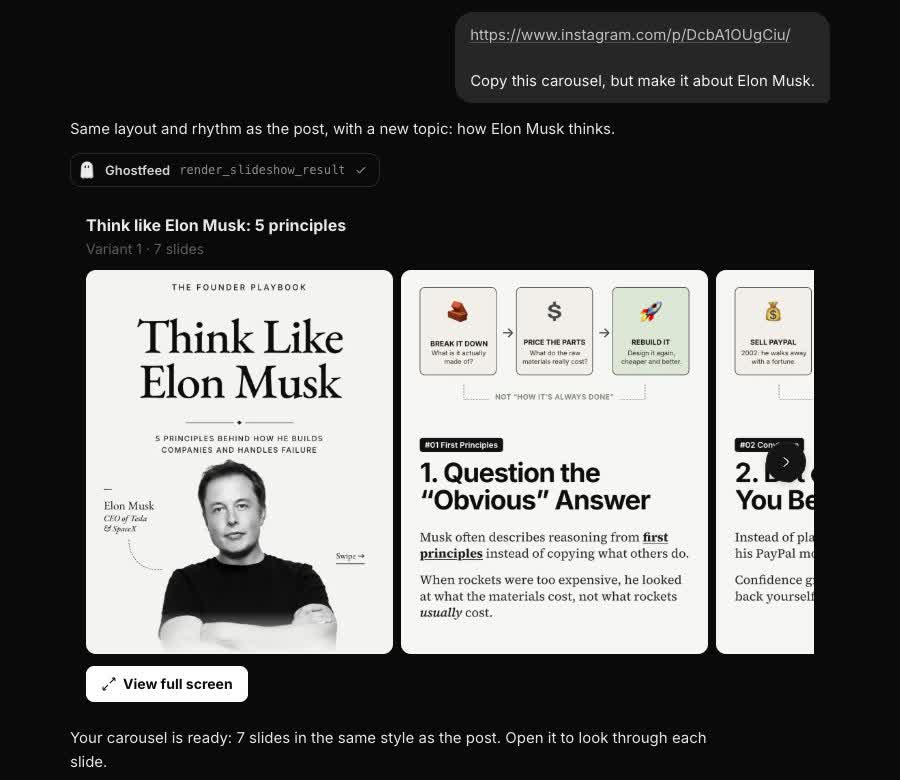
- TikTok slideshows and Instagram carousels of up to 20 slides, in 9:16, 4:5, 3:4 or 1:1. Every slide is HTML and CSS, so the text is exactly what was written and you can still edit it by hand.
- Images from a prompt, from up to 10 reference images, as an edit of an image, or as a copy of an image.
- Songs and voiceovers for any of the above. A song is 10 seconds to 6 minutes long.
Things to ask for
You type a request like one of these. The agent reads the right skill and does it.
- “Make a 30 second whiteboard ad for my app. Here is the App Store link: ... Use a calm voiceover.”
- “Write a song ad for my protein bar. Upbeat indie pop, female lead, 30 seconds. Then make a 2D cartoon music video for it.”
- “Copy this TikTok with my avatar Nova, holding my product. https://www.tiktok.com/@someone/video/...”
- “Make me an avatar: early twenties, South Asian, long dark hair, sitting in a cafe with warm window light.”
- “Build me a 6 slide deck on why my morning routine changed after I started waking up at 5am. Moody and warm, no stock photo look. Hook on slide 1, payoff on slide 6.”
- “What did I spend credits on today, and what is still rendering?”
How to connect each AI app
The steps are the same three everywhere: add the server URL, sign in with Google, pick your workspaces. The server URL is https://api.ghostfeed.ai/api/v2/mcp.
| AI app | How to add it |
|---|---|
| Claude (web, desktop, mobile) | Open Settings → Connectors, click Add → Add custom connector, name it Ghostfeed and paste the server URL. Click Add, then Connect. The Claude tab at the top of this page has a button that fills this in for you. |
| ChatGPT | Open Settings → Plugins, click Add → Add MCP server, name it ghostfeed, choose Streamable HTTP and paste the server URL. Sign in the first time a Ghostfeed tool runs. |
| Claude Code | claude mcp add --transport http ghostfeed https://api.ghostfeed.ai/api/v2/mcpThen run /mcp, pick ghostfeed and choose Authenticate. |
| Codex CLI | codex mcp add ghostfeed --url https://api.ghostfeed.ai/api/v2/mcpcodex mcp login ghostfeed |
| Cursor | Add this to ~/.cursor/mcp.json (every project) or .cursor/mcp.json (one project):{
"mcpServers": {
"ghostfeed": {
"url": "https://api.ghostfeed.ai/api/v2/mcp"
}
}
} |
| VS Code | Add this to .vscode/mcp.json:{
"servers": {
"ghostfeed": { "type": "http", "url": "https://api.ghostfeed.ai/api/v2/mcp" }
}
} |
| Grok | Open grok.com/connectors, click New Connector, choose Custom and paste the server URL. |
| Grok Build | grok mcp add --transport http ghostfeed https://api.ghostfeed.ai/api/v2/mcp |
| Any other MCP app | Add a remote MCP server that uses Streamable HTTP and paste the server URL. The app needs to support OAuth. |
The 20 skills on the server
A skill is a written method: the order of steps, what to ask you, what each step costs and what a good result looks like. The server carries 20 of them and your agent reads the one it needs. There is nothing to install, and every connected agent gets the newest version on its next request.
| Group | Skills |
|---|---|
| Video ads (13) | ghostfeed-video-ads, ghostfeed-song, ghostfeed-ad-copy, ghostfeed-ad-characters, ghostfeed-ad-style-claymation, ghostfeed-ad-style-paper, ghostfeed-ad-style-3d-cartoon, ghostfeed-ad-style-2d-cartoon, ghostfeed-ad-style-realistic, ghostfeed-ad-style-whiteboard, ghostfeed-ad-style-zack-d, ghostfeed-ad-style-skeleton, ghostfeed-ad-style-cinematic |
| UGC and creators (2) | ghostfeed-ugc-reactions, ghostfeed-avatars |
| Slideshows (3) | ghostfeed-slideshows, ghostfeed-slideshow-taste, ghostfeed-slideshow-clone |
| Library (2) | ghostfeed-brands, ghostfeed-collections |
The tools
The server has about 100 tools, and the number changes with each release. Every tool also has a REST endpoint with the same name and inputs at https://api.ghostfeed.ai/api/v2, with the same sign-in. The full list, with every input, is in the docs.
| Group | What it does | Some of its tools |
|---|---|---|
| Core | Who you are, your workspaces and your credits. | get_me, list_workspaces, get_credits, list_transactions |
| Images and videos | One tool per task, plus the model lists and source videos to copy. | text_to_image, reference_to_image, image_edit, clone_image, text_to_video, image_to_video, reference_to_video, motion_to_video, audio_to_video |
| Songs and voiceovers | Songs with exact lyrics, voiceovers, and the timing of each word. | text_to_music, text_to_speech, list_voices, get_audio_timings |
| Avatars | Draft an AI creator, approve it, rename it, add your own photos. | create_avatar, approve_avatar, rename_avatar, add_avatar_images |
| Brands and product images | Make a Brand from a website or a name and keep its product images. | create_brand, update_brand, read_brand_products, add_product_images |
| Slideshow building | Start a deck, find pictures, write each slide, see it rendered and make variants. | create_blank_slideshow, search_pinterest, search_google_images, write_slide_html, create_variant |
| Slideshows | Read, rename, move, export and delete decks and their variants. | list_slideshows, get_slideshow, update_variant, export_slideshows |
| Library | Image collections, filled by hand or from Pinterest. | create_collection, add_collection_images, import_pinterest_url |
| Media | Upload your own photos and videos and pull exact frames. | request_media_upload, get_video_frame, analyze_image |
| Generations | Follow a job, read its saved prompt and reuse its settings. | get_generation, list_generations, get_generation_setup |
| Workflow skills | Read the skills on the server. | list_skills, get_skill |
Models and what things cost
Everything is paid in credits, from the same balance as the Ghostfeed app. The dollar figures below assume 10 cents a credit.
| What | Credits | At 10 cents a credit |
|---|---|---|
| Image | 0.5 to 2.5 credits each. 1 credit on the default model, Nano Banana 2. | $0.05 to $0.25 |
| Video | 0.25 to 6 credits a second, by model and resolution. 1 credit a second on the recommended model, MiniMax H3 Max, at 768p. | A 10 second clip on the recommended model: $1.00 |
| Song | 1 credit for one request, which returns two versions. | $0.10 |
| Voiceover | 1 credit for each started 1,000 characters. | $0.10 per 1,000 characters |
| Slideshow | A blank deck is free. The first content edit on a deck costs 1 credit and later edits are free. Each variant costs 1 credit. | $0.10 a deck, $0.10 a variant |
| Importing a source, cropping it, pulling frames and reading what happens in it | Free. | $0.00 |
An example: a 30 second ad made as three 10 second clips on the recommended model at 768p is 3 start pictures (3 credits), 30 seconds of video (30 credits) and one voiceover of up to 1,000 characters (1 credit). That is 34 credits, or $3.40.
Today there are 15 video models (MiniMax H3 and H3 Max, Wan 3 and Wan 3 Prime, four Seedance models, P-Video 2 Pro and its lip sync model, Grok Imagine, PixVerse v6 and three Kling models), 9 image models (four Nano Banana models and five GPT Image models), 3 song models (Suno V6) and 2 voice models (ElevenLabs). There is no default video model: the agent names the model and its price, and you can ask for another.
What works in which AI app
| Where | What you get |
|---|---|
| Claude apps and ChatGPT | Live widgets in the chat: an avatar builder, a crop editor, galleries and playable results. An ad with several scenes comes back as separate clips, because a chat app cannot join them. |
| Claude Code, Codex and Cursor | Links instead of widgets. These have a shell, so the agent joins the clips itself and hands you one finished video. |
| The Ghostfeed app | Its own agent chat with the same skills. It joins clips, and it is where you edit slides by hand and send posts to TikTok. |
What it cannot do
- It does not post or schedule. Posting happens in the Ghostfeed app, which sends the post to your TikTok inbox for you to publish.
- One clip is at most 15 seconds on the recommended video model. Three models (Wan 3, Wan 3 Prime and Seedance 2.5) go up to 30 seconds. A longer ad is several clips. Lip sync runs up to 3 minutes on one model, P-Video 2 Pro Avatar.
- It cannot join clips in a chat app. Use Claude Code, Codex, Cursor or the Ghostfeed app when you want one finished file.
- It cannot manage or delete videos. That stays in the Ghostfeed app. It can edit and delete slideshows.
- It does not spend silently. The agent names the model and the cost before each paid step and waits for your go. The charge shows up in your billing history.
- It has no API keys and no SSE endpoint. Your AI app must support remote MCP servers with OAuth.
Price
Paid from $29/mo. There is no free plan. Every plan includes the connection, and chat spends the same credits as the app. Plans and what each includes are on the pricing page. To start, make an account and connect your AI app with the steps above.
More to read
- Docs: the quickstart, every tool and the REST API.
- What changed: every released change, by version.
- The Ghostfeed MCP guide: the same connection, explained step by step with more prompts.
- ghostfeed-ai/skills on GitHub: an optional copy of the skills as a Claude plugin. You do not need it to use the connection.
- llms.txt: Ghostfeed for AI agents.
Common
questions.
UGC videos with AI creators or your own face, TikTok slideshows and Instagram carousels, static ads, animated and song ads, voiceovers and music. The same tools as the Ghostfeed app.
Only the workspaces you pick when you sign in. There it can read and make media, slideshows, avatars and brands, and edit or delete slideshows. Managing and deleting videos stays in the Ghostfeed app.
Yes. What it makes uses the same credits as the app.
Claude, ChatGPT, Claude Code, Codex, Cursor, VS Code, Grok and Grok Build, and any app that supports remote MCP servers over Streamable HTTP with OAuth. Add one link and sign in with Google.
Yes. Paid from $29/mo, and there is no free plan. Every plan includes the connection.
No. The skills are on the server and the agent reads them when it needs them. The GitHub copy is optional.
No. It does not post or schedule. Posting happens in the Ghostfeed app, which sends the post to your TikTok inbox for you to publish.
One clip is at most 15 seconds on the recommended model and up to 30 seconds on three other models. A longer ad is several clips. Claude Code, Codex, Cursor and the Ghostfeed app join them into one file. Claude and ChatGPT chat hand you the clips.
No. The agent names the model and the cost before each paid step and waits for your go.
Yes. Avatars, Brands, collections, slideshows, pictures and videos are read from the workspace, whoever made them.
Every tool has a REST endpoint at https://api.ghostfeed.ai/api/v2 with the same sign-in and the same answers, and the contract is versioned.